


Housecall Pro: Field Service
4.51.59K Reviews
App Specs
- Version
- 2026.8.5
- Updated On
- License
- Free
- Downloads
- 500,000+
- Developer
- Codefied Inc.
- Categories
- Business
- Platform
- Android, iOS
Screenshots

 Analysis by AppCompare
Running a service business from a phone sounds simple until estimates, appointments, technician updates, customer messages, and invoices start competing for attention. Housecall Pro: Field Service is built for that exact pressure. I found it most useful as a shared workspace for turning a customer request into a scheduled job, sending the right person to it, and keeping the financial follow-up connected to the visit. It is a free business app from Codefied Inc., aimed at field-service companies rather than general office teams.
The app has earned a 4.5 average from around 6,700 ratings, with more than 500,000 installs. That gives it a solid track record without making it automatically right for every company. My impression is that its value depends less on one spectacular tool and more on whether a team is willing to replace scattered notes, texts, spreadsheets, and paper invoices with one repeatable process.
How the everyday workflow feels in practice
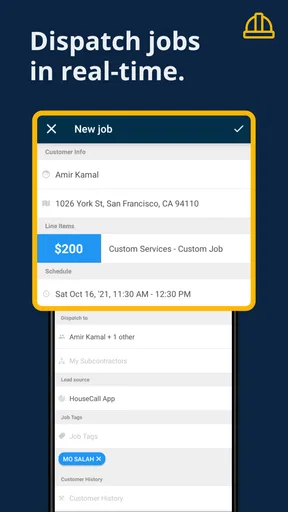
The natural starting point is a customer request. Instead of writing the details in a notebook and hoping someone remembers to transfer them later, I would use the app to shape that request into an estimate or job, then move it toward scheduling. The important benefit is continuity: the information gathered early can remain attached to the work as it becomes an appointment, a dispatch task, and eventually an invoice.
That flow is especially helpful for a small plumbing, electrical, cleaning, landscaping, or repair company where the person answering the phone may also be the scheduler. A customer might call about a leaking water heater in the morning. The office can capture the request, prepare an estimate, choose a visit time, and dispatch the job. The technician can then work from the same operational record instead of receiving a chain of incomplete messages.
I like this approach because it reduces the handoff problem. In many small businesses, mistakes happen between the phone call and the van arriving: the address is incomplete, the requested service is vague, or the customer assumes a price was already approved. Keeping the estimate and scheduling work together makes those gaps easier to spot before the appointment.
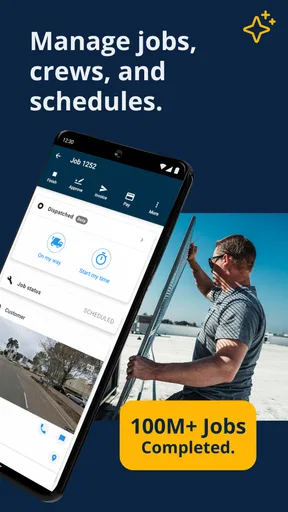
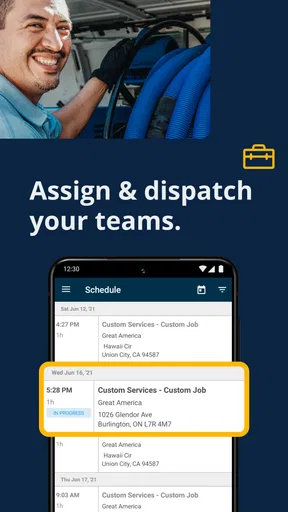
The dispatch side is where the app becomes more than a digital address book. A scheduler needs to see the day as a set of commitments, not just a list of names. Housecall Pro is designed around that field-service reality, so the useful habit is to treat every job as an operational unit: customer details, service description, timing, assigned worker, and billing follow-up should be checked before the job is considered ready.
That habit matters when plans change. A cancellation, delay, or emergency call can create a chain reaction across the day. If the schedule is maintained in one place, the person coordinating the work has a better chance of making a deliberate adjustment rather than sending several hurried texts. I would still expect the team to communicate clearly, but the app gives that communication a more dependable source of truth.
Worth Reading Before You Choose

EA SPORTS FC Mobile 26 Is a Bigger Football Game, but It Takes Time

Flipboard Shows What News Apps Must Do Beyond the Feed

Switching to Android Auto Means Rethinking Your Driving Routine

Google Calendar Makes a Crowded Week Easier to Manage

Ludo King Makes the Most of the Minutes Between Plans

Baby Panda World Brings Quick Play to Modern Phones, but Its Game Library Feels Busy
What the customer journey looks like
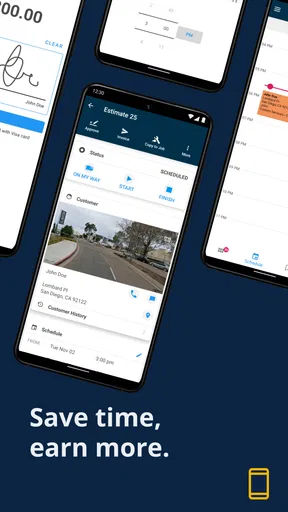
For a customer, the experience is not about seeing every internal scheduling decision. It is about receiving a clear estimate, getting a realistic appointment, knowing who is handling the work, and receiving an understandable invoice afterward. The app’s estimate-to-invoice path supports that sequence, provided the business enters accurate information at each stage.
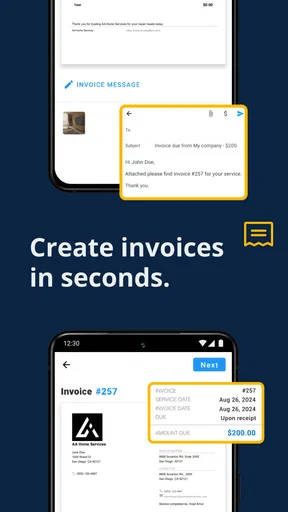
I would be careful not to treat the invoice as an afterthought. A rushed invoice with an unclear service description can undo the trust created by a well-run visit. A better routine is to review the job record while the details are still fresh, confirm what was actually done, and make sure the bill matches the approved scope. The app can organize this process, but it cannot correct vague descriptions or inconsistent company habits.
That is one of the first trade-offs I noticed. Centralization is powerful only when everyone uses the same record properly. If one technician keeps private notes, another relies on text messages, and the office edits the schedule without updating the job, the business still has fragmented information—just in more places.
Settings I would check before inviting a whole team
I would not begin by rushing through every option. I would first establish the company’s basic working language: how services are named, how estimates are described, how appointments are represented, and what information a technician needs before leaving the shop. Consistency here makes later searches and reviews much easier.
Service names deserve more attention than they usually receive. A vague label such as “repair” may be quick to enter, but it tells the office very little when several jobs are open. More precise wording helps the scheduler assign suitable work and helps the technician prepare. The goal is not to create a giant catalog; it is to make common jobs recognizable without forcing staff to interpret shorthand.
I would also check the way customer and property details are recorded. A field-service visit can fail because of a missing unit number, an unclear access note, or a customer preference that was never passed along. Before relying on the app, I would decide which details are essential for every booking and make them part of the normal intake conversation.
The next setting-related habit is permission and responsibility, even if the actual controls vary by account or role. Every team should know who owns the schedule, who can revise an estimate, and who reviews invoices before they go out. The app may put the tools in one place, but unclear ownership still leads to duplicate edits and contradictory instructions.
Version 2026.8.5 is intended for devices running operating system version 9 or later. That makes device compatibility an early practical check for a mixed fleet. I would test the app on the oldest phone or tablet the team expects to use, not only on the newest office device. A workflow that works beautifully at the desk is not useful if a field worker cannot comfortably use it on their assigned hardware.
The age rating is Everyone, which fits its business purpose and makes it straightforward to introduce in a general workplace. The bigger onboarding question is not age suitability; it is whether staff can learn the sequence without skipping important details. I would train the team around a sample job from first contact through invoice rather than demonstrating isolated screens.
Small routines that make the app faster
Experienced users usually gain speed by reducing decisions, not by tapping faster. I would create a short intake script for common calls, then enter the same essential details in the same order. That makes estimates and scheduling more predictable and exposes missing information before the job reaches dispatch.
Another useful pattern is to prepare the next action immediately. When an estimate is created, decide whether it needs scheduling, customer approval, or an internal review. When a job is completed, decide whether it is ready for invoicing or needs clarification. This prevents the app from becoming a storage bin full of records that nobody knows how to advance.
I also recommend a daily schedule review at a fixed point, ideally before technicians are already moving between jobs. Look for overlapping commitments, unusually long travel assumptions, incomplete addresses, and appointments lacking a clear service description. This is a simple practice, but it turns the scheduling screen into a planning tool rather than a passive calendar.
A less obvious benefit of this routine is better customer communication. When the office reviews the day as a whole, it can identify customers who may be affected by delays and contact them before they start calling. The app does not remove the need for judgment; it makes the relevant jobs easier to see together.
For repeat customers, I would resist copying old information without checking it. A familiar address may still have a new access instruction, a changed contact person, or a different problem from the previous visit. Reusing a customer record can save time, but it should be a starting point, not permission to skip the conversation.
Another practical shortcut is to separate urgent operational notes from long explanations. Dispatch needs information that helps someone arrive and work safely; the invoice needs information that helps the customer understand the charge. Keeping those purposes distinct makes both records clearer. I would not bury a critical access instruction inside a paragraph written mainly for billing.
Where the all-in-one approach helps most
The strongest fit is a growing service business that has outgrown a paper calendar but does not want to assemble several specialized systems. Housecall Pro brings estimating, scheduling, dispatch, and invoicing into one business-focused workflow. That can be easier to manage than having one app for appointments, another for estimates, and a separate invoicing tool that the office must reconcile later.
Compared with a basic calendar, it is more aligned with the life of a service call. A calendar can tell you when something is happening, but it does not naturally represent the movement from customer request to estimate, field work, and bill. Compared with spreadsheets, the app offers a more direct working environment for teams who need to update jobs while away from the office.
There is also a human advantage. When the office and field staff work from a common job record, a customer does not have to repeat the same story to every person involved. That is a modest improvement, but it is exactly the kind of improvement that becomes valuable across a busy week.
On the other hand, a highly specialized company may prefer a narrower tool. If your business needs deep inventory management, complex project accounting, extensive warehouse operations, or industry-specific compliance workflows, an all-in-one field-service app may not cover every requirement. In that situation, a dedicated system—or a connected combination of tools—could be a better long-term choice.
Limits that become clearer as the business grows
The first limitation is process dependence. The app can make a disciplined workflow easier, but it cannot enforce good judgment at every step. A technician can still leave a job with incomplete notes. An office worker can still schedule too tightly. A customer can still receive an estimate that does not explain the work clearly.
The second is the learning curve created by centralization. New users may initially feel that there are more steps than with a quick text message or handwritten note. That reaction is understandable. The answer is not to recreate the old shortcuts inside the new system; it is to identify the minimum information needed at each stage and train around that sequence.
There is also a risk of making the schedule look more precise than it really is. Field work contains surprises, travel delays, parts issues, and customers who need extra explanation. I would use the schedule as a plan with room for judgment, not as a promise that every appointment will run exactly on time.
Businesses should also think about connectivity and device conditions in the field. A phone may be used outdoors, in a basement, or while the worker is carrying equipment. Before making the app central to operations, test the real working environment and decide what information must be reviewed before departure. That is a sensible precaution for any mobile field-service workflow.
Another important question is whether the team actually needs all four parts of the workflow. A solo professional with only a few appointments may find a simpler calendar and invoicing arrangement quicker. The benefit of Housecall Pro becomes clearer when coordination itself is the problem—multiple workers, frequent schedule changes, repeated estimates, or a growing number of open jobs.
Who should use it, and who should skip it
I would recommend it to owners who are tired of reconstructing job history from messages, notebooks, and memory. It is particularly suitable for businesses where the same customer journey happens repeatedly and where dispatch quality affects both revenue and reputation.
I would also consider it for a small team that is preparing to grow. Establishing a consistent process before the schedule becomes chaotic is easier than trying to repair habits after information has spread across several personal systems. The free price makes experimentation less financially demanding, although the real cost is staff time spent learning and maintaining the workflow.
I would skip it if your work is mainly office-based, your scheduling is extremely simple, or your billing needs are already handled by a system the team understands well. Replacing a stable process just because an app combines several functions is not automatically an improvement. I would also look elsewhere if your operation depends on specialized capabilities that go far beyond ordinary estimating, dispatch, and invoicing.
The developer, Codefied Inc., has positioned the product around field-service management rather than a generic task list. That focus is its main reason to consider it. It is not trying to be a universal business suite in the way a broad accounting or collaboration platform might be; its appeal comes from connecting the practical stages of a service visit.
My final view after building a repeatable routine
Housecall Pro: Field Service works best when treated as an operating method, not merely an app to install. The useful sequence is clear: capture the request carefully, prepare a readable estimate, schedule with realistic information, dispatch from the shared record, and finish the billing step while the job is still fresh.
My favorite aspect is the reduction in handoff friction. My biggest caution is that centralization can expose weak habits instead of magically fixing them. Teams that review their settings, agree on naming and responsibilities, and perform a short daily schedule check are likely to get far more from it than teams that only use it as a digital calendar.
It is free, rated for Everyone, and has been available since June 9, 2014, with the current release listed as 2026.8.5. Those details make it accessible to try, but the decision should still come down to workflow fit. The real test is whether your business needs one dependable path from estimate to invoice.
For a service company managing several moving jobs, I would recommend giving it a serious trial and judging it with a complete customer scenario rather than a quick glance. For a solo operator with very little coordination, a lighter alternative may be faster. For everyone in between, its value will come from the habits built around it: accurate intake, deliberate scheduling, clear job notes, and a final review before the invoice leaves the business.
Pros
- Clear scheduling and dispatch tools help organize daily field operations.
- Customers can receive estimates
- invoices
- and payment options digitally.
- Built-in messaging keeps office staff
- technicians
- and customers connected.
- Job photos and notes make service records easier to review later.
- Supports recurring services and automated reminders for repeat appointments.
Cons
- Many useful features require a paid subscription or higher-tier plan.
- The wide feature set may feel overwhelming for small
- occasional contractors.
- Some workflows depend heavily on a reliable internet connection.
- Payment processing and other add-ons can increase overall operating costs.
- The app is designed for businesses
- not individual homeowners seeking repairs.
FAQs for Housecall Pro: Field Service
What is Housecall Pro: Field Service used for?
Housecall Pro: Field Service is a business management app designed for home-service professionals, including plumbers, electricians, HVAC technicians, cleaners, and other contractors. It helps teams organize jobs, view schedules, manage customer information, send estimates and invoices, accept payments, and communicate with clients. The app is primarily intended for businesses rather than homeowners looking for a one-time service.
Can Housecall Pro: Field Service be used by both technicians and office staff?
Yes. Housecall Pro is built to support different roles within a service business. Office staff can schedule appointments, assign technicians, update customer records, and monitor job progress, while field workers can access job details, navigate to appointments, communicate with customers, create estimates, and collect payments from a mobile device. Available features may depend on the company’s subscription plan and user permissions.
Does Housecall Pro: Field Service work on Android and iPhone?
Housecall Pro: Field Service is designed for mobile use and is available for supported Android and iOS devices, although exact compatibility can vary by operating-system version and device model. Before downloading, it is worth checking the current requirements in Google Play or the App Store. Some administrative tools may also be easier to use through the company’s web-based dashboard.
Can customers pay invoices through Housecall Pro?
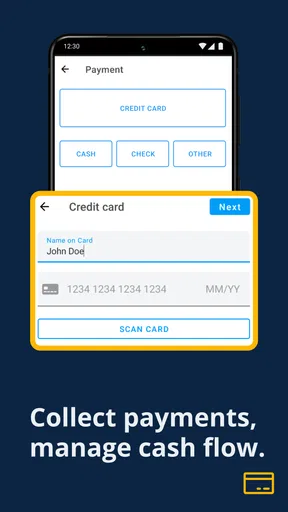
The app supports payment-related workflows for service businesses, allowing contractors to present invoices, request payment, and process transactions through supported methods. Whether a particular payment option is available can depend on the business account, region, hardware, and Housecall Pro plan. Users should also review applicable processing fees, refund policies, and account terms before relying on the app for all payment collection.
Is Housecall Pro: Field Service free to use?
Housecall Pro generally operates as a subscription-based business platform rather than a completely free app. The mobile application may be available to download without an upfront charge, but using its scheduling, invoicing, customer-management, payment, and automation features typically requires an eligible company plan or account. Pricing and included tools can change, so businesses should review the latest official plans, trial conditions, and cancellation terms before subscribing.


